- 1 1. Get the Current Time in MySQL (Bottom Line: Shortest SQL Cheat Sheet)
- 1.1 1.1 MySQL current date and time: NOW() / CURRENT_TIMESTAMP
- 1.2 1.2 MySQL current date: CURDATE()
- 1.3 1.3 MySQL current time: CURTIME()
- 1.4 1.4 MySQL current UTC time: UTC_TIMESTAMP()
- 1.5 1.5 MySQL current time with milliseconds: NOW(3) / CURRENT_TIMESTAMP(3)
- 1.6 1.6 Quick cheat sheet by purpose
- 1.7 Common pitfalls summary
- 2 2. Differences Between MySQL NOW() and CURRENT_TIMESTAMP
- 3 5. Calculating Date/Time Differences in MySQL (DATEDIFF / TIMESTAMPDIFF)
- 4 6. Date Range Queries Using Current Time
1. Get the Current Time in MySQL (Bottom Line: Shortest SQL Cheat Sheet)
If you want to get the current time in MySQL, there are only a few SQL functions you need to remember.
Below is the shortest answer for the search keyword “MySQL get current time”.
1.1 MySQL current date and time: NOW() / CURRENT_TIMESTAMP
Returns the current date + time (YYYY-MM-DD HH:MM:SS).
SELECT NOW();
SELECT CURRENT_TIMESTAMP;Example output
2025-02-01 15:30:45NOW()andCURRENT_TIMESTAMPusually return the same result.- Both return the current date and time.
- If you need milliseconds, use the following.
SELECT NOW(3);Notes (common mistakes)
- Depends on the server time zone setting.
- In a UTC environment, you may get UTC instead of Japan time.
- During query execution, it basically returns the same time (fixed within a single statement).
1.2 MySQL current date: CURDATE()
Returns only the date (no time).
SELECT CURDATE();Example output
2025-02-01Use cases
- Query today’s data
- Date comparisons (e.g., filter only today’s records)
Notes
- The return value is a
DATEtype. - Not suitable when you need time-of-day processing.
1.3 MySQL current time: CURTIME()
Returns only the time.
SELECT CURTIME();Example output
15:30:45Use cases
- Business hours checks
- Branching logic by time window
Notes
- Does not include date information.
- Cannot be used to compare with
DATE-type columns.
1.4 MySQL current UTC time: UTC_TIMESTAMP()
Returns the time in UTC (Coordinated Universal Time), regardless of the server time zone setting.
SELECT UTC_TIMESTAMP();Example output
2025-02-01 06:30:45When you should use it
- Global services
- Designs that store logs in UTC consistently
Common mistakes
- Mixing it with
NOW()causes time offsets - If the app assumes JST, you’ll see a 9-hour difference
1.5 MySQL current time with milliseconds: NOW(3) / CURRENT_TIMESTAMP(3)
MySQL 5.6 and later supports fractional seconds.
SELECT NOW(3);
SELECT CURRENT_TIMESTAMP(3);Example output
2025-02-01 15:30:45.123Notes for storing
Your column must also support fractional seconds.
DATETIME(3)
TIMESTAMP(3)
If you store it into a non-supported column, the fractional part will be truncated.
1.6 Quick cheat sheet by purpose
| Purpose | SQL |
|---|---|
| Current date and time | SELECT NOW(); |
| Get UTC | SELECT UTC_TIMESTAMP(); |
| Date only | SELECT CURDATE(); |
| Time only | SELECT CURTIME(); |
| Get milliseconds | SELECT NOW(3); |
Common pitfalls summary
- Time is offset because you didn’t verify the time zone
- Using
NOW(3)without a milliseconds-capable column - Mixing UTC and local time
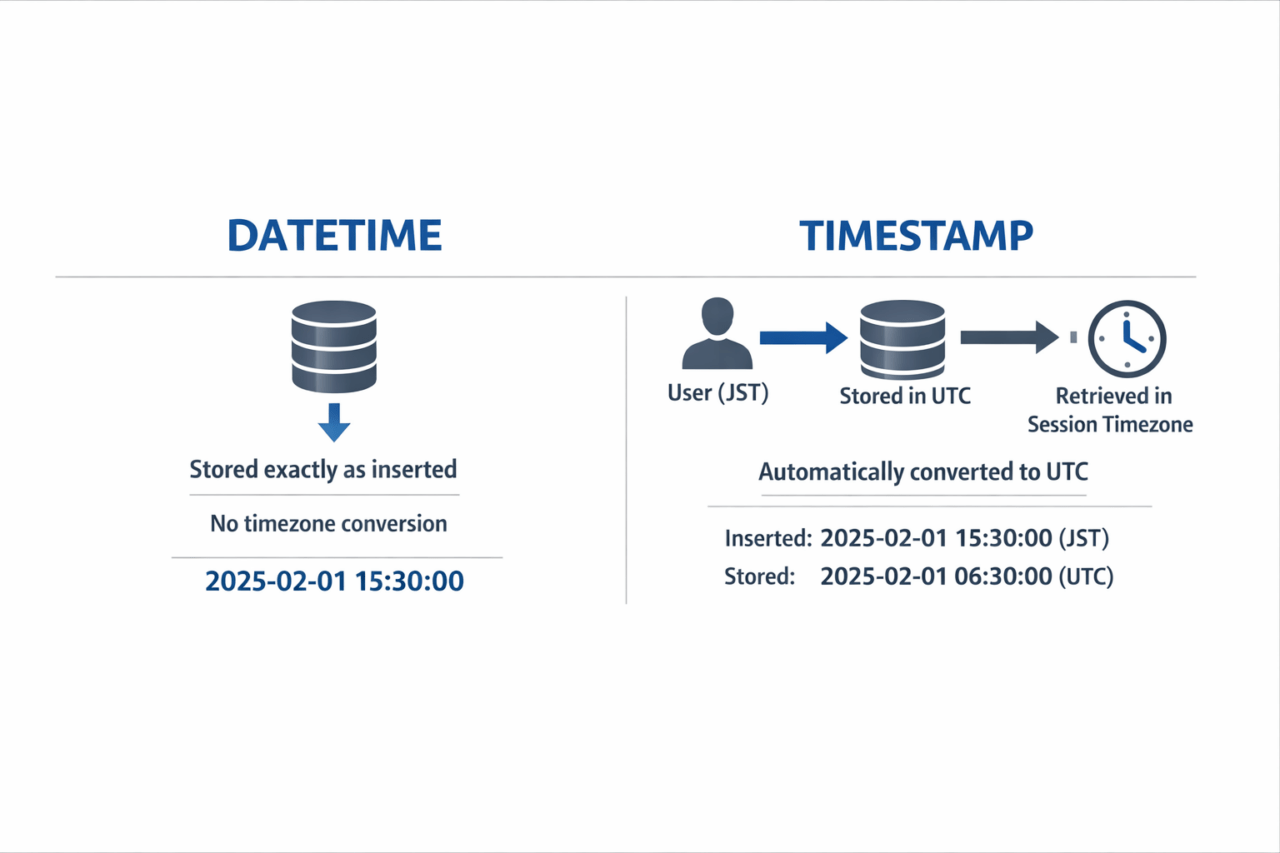
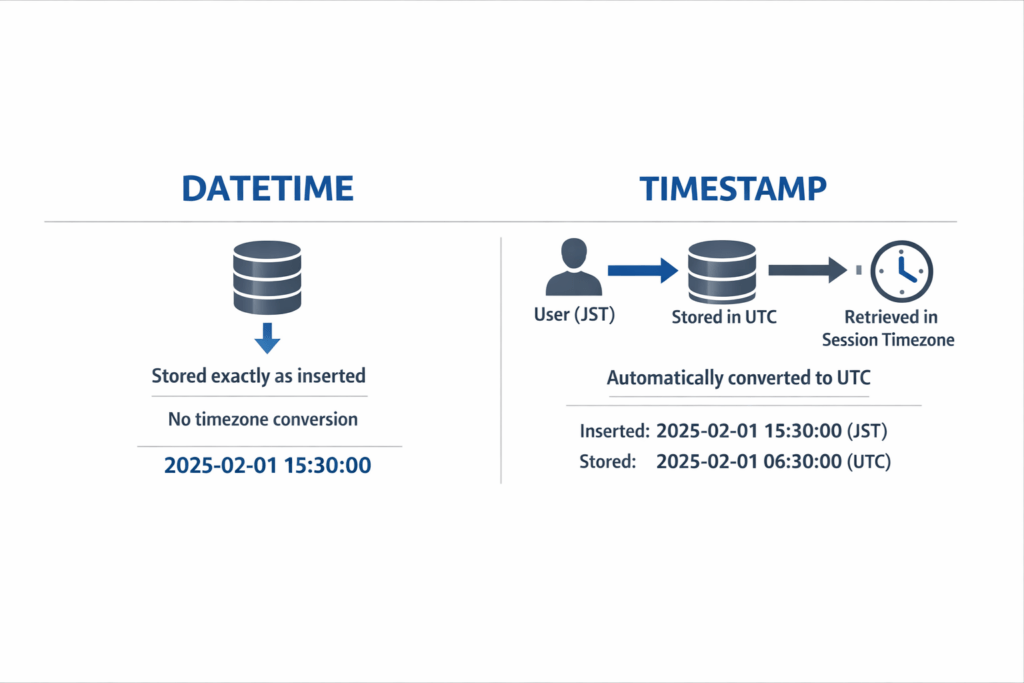
- Not understanding the difference between DATETIME and TIMESTAMP
2. Differences Between MySQL NOW() and CURRENT_TIMESTAMP
NOW() and CURRENT_TIMESTAMP look similar, but misunderstanding where to use them and how they behave can easily cause bugs. Here we整理 the differences, correct usage, and common pitfalls.
2.1 Which should you use? (SELECT usage / DEFAULT usage)
■ When retrieving the current date/time in SELECT
SELECT NOW();
SELECT CURRENT_TIMESTAMP;
Normally, both return the same result.
- They are equivalent (synonyms)
- The return value is equivalent to
DATETIME - Affected by the time zone setting
Practical takeaway
- Prefer readability →
NOW() - Prefer standard SQL style →
CURRENT_TIMESTAMP
■ When setting a column default value
CREATE TABLE logs (
    id INT AUTO_INCREMENT PRIMARY KEY,
    created_at TIMESTAMP DEFAULT CURRENT_TIMESTAMP
);
The key point here is:
For a default value, it’s common to use
CURRENT_TIMESTAMP.
Some environments allow NOW() too, but behavior can differ depending on MySQL version and SQL mode. The safer choice is CURRENT_TIMESTAMP.
2.2 Correct usage of DEFAULT / ON UPDATE
If you want to auto-update an “updated at” timestamp:
CREATE TABLE logs (
    id INT AUTO_INCREMENT PRIMARY KEY,
    created_at TIMESTAMP DEFAULT CURRENT_TIMESTAMP,
    updated_at TIMESTAMP DEFAULT CURRENT_TIMESTAMP
        ON UPDATE CURRENT_TIMESTAMP
);
Behavior
- On INSERT → sets current time for created_at / updated_at
- On UPDATE → updates only updated_at
Common mistakes
- Not matching fractional-second precision when using
DATETIME - Hitting older MySQL limitations with multiple TIMESTAMP columns (MySQL 5.6 and earlier had restrictions)
2.3 Differences Between NOW() and SYSDATE() (Important)
The easy-to-miss point is the difference from SYSDATE().
SELECT NOW(), SYSDATE();■ Behavior differences
NOW()→ fixed at query start timeSYSDATE()→ returns the time at the moment it’s called
Example:
SELECT NOW(), SLEEP(3), NOW();NOW() returns the same value.
SELECT SYSDATE(), SLEEP(3), SYSDATE();SYSDATE() shows a 3-second difference.
2.4 Which one should you use?
| Function | Behavior | Recommended use |
|---|---|---|
| NOW() | Fixed within a query | Logging, consistency-focused |
| SYSDATE() | Call-time value | Precise real-time retrieval |
Why NOW() is often recommended in real-world systems
- Maintains consistency inside a transaction (a mechanism that processes multiple SQL statements together)
- Safer in replication environments
2.5 Common misunderstandings and issues
❌ “NOW() and CURRENT_TIMESTAMP are exactly the same, so you don’t need to think about it.”
→ Differences can show up in defaults or update behavior, depending on the environment.
❌ “SYSDATE() is more accurate, so it’s always better.”
→ It may cause problems in replication environments.
❌ Not verifying the time zone
SHOW VARIABLES LIKE '%time_zone%';If you use it without checking, you can get time offsets.
2.6 Practical best practices
- SELECT retrieval →
NOW() - Column default →
CURRENT_TIMESTAMP - Auto-update →
ON UPDATE CURRENT_TIMESTAMP - Consistency-focused → default to
NOW() - UTC-based design →
TIMESTAMP+ store in UTC
3. MySQL Current Time Formatting (DATE_FORMAT / TIME_FORMAT)
After retrieving the current time in MySQL, it is very common to change the display format.
For the search intent “MySQL current time format,” the most important function to understand is DATE_FORMAT().
3.1 MySQL datetime formatting: DATE_FORMAT(NOW(), …)
Basic syntax:SELECT DATE_FORMAT(target_datetime, 'format_string');
Example: format the current timeSELECT DATE_FORMAT(NOW(), '%Y-%m-%d %H:%i:%s');
Example output2025-02-01 15:30:45
Commonly used format specifiers
Specifier
Meaning
Example
%Y
Year (4 digits)
2025
%m
Month (2 digits)
02
%d
Day (2 digits)
01
%H
Hour (24-hour)
15
%h
Hour (12-hour)
03
%i
Minute
30
%s
Second
45
%p
AM/PM
PM
3.2 Converting to Japanese-style or 12-hour format
■ Japanese-style formatSELECT DATE_FORMAT(NOW(), '%Y-%m-%d %H:%i');
Example output:2025-02-01 15:30
■ 12-hour format + AM/PMSELECT DATE_FORMAT(NOW(), '%Y-%m-%d %h:%i:%s %p');
Example output:2025-02-01 03:30:45 PM
3.3 MySQL time-only formatting: TIME_FORMAT()
A formatting function specifically for TIME type data.SELECT TIME_FORMAT(CURTIME(), '%H:%i');
Example output:15:30
NotesTIME_FORMAT() is for TIME type only
For DATETIME, use DATE_FORMAT()
3.4 String → datetime conversion: STR_TO_DATE()
To convert string data into a datetime type:SELECT STR_TO_DATE('2025-02-01 15:30:45', '%Y-%m-%d %H:%i:%s');
Example output:2025-02-01 15:30:45
Common mistakes
Format mismatch returns NULL
Confusing %m and %c (zero-padded vs non-zero-padded month)
3.5 Important points in production
❌ Do not compare after formatting
Bad example:WHERE DATE_FORMAT(created_at, '%Y-%m-%d') = '2025-02-01';
This is not recommended because indexes become ineffective (query performance degrades).
Recommended:WHERE created_at >= '2025-02-01' AND created_at < '2025-02-02';
❌ Don’t over-format on the DB side
In web apps, formatting for display is usually more flexible on the application side
The database should focus on “storage and calculation”
3.6 Formatting with millisecondsSELECT DATE_FORMAT(NOW(3), '%Y-%m-%d %H:%i:%s.%f');%f represents microseconds (6 digits).
Note
If the column is not DATETIME(3) or similar, the fractional part will be truncated
Available in MySQL 5.6 and later
3.7 Summary by formatting purpose
Purpose
Function
Change display format
DATE_FORMAT
Format time only
TIME_FORMAT
String → datetime conversion
STR_TO_DATE
Display milliseconds
%f
4. MySQL Date and Time Addition/Subtraction (DATE_ADD / DATE_SUB)
Even if you can retrieve the current time, you cannot use it effectively in production without date/time calculations such as “X days later” or “X hours ago.”
Here we explain how to use DATE_ADD() and DATE_SUB() with the current time in MySQL.
4.1 MySQL datetime addition: DATE_ADD()
Basic syntax:SELECT DATE_ADD(base_datetime, INTERVAL value unit);
Example: 7 days from nowSELECT DATE_ADD(NOW(), INTERVAL 7 DAY);
Example: 2 hours laterSELECT DATE_ADD(NOW(), INTERVAL 2 HOUR);
Commonly used units
Unit
Meaning
SECOND
Seconds
MINUTE
Minutes
HOUR
Hours
DAY
Days
MONTH
Months
YEAR
Years
4.2 MySQL datetime subtraction: DATE_SUB()
Basic syntax:SELECT DATE_SUB(base_datetime, INTERVAL value unit);
Example: 30 days agoSELECT DATE_SUB(NOW(), INTERVAL 30 DAY);
Example: 1 hour agoSELECT DATE_SUB(NOW(), INTERVAL 1 HOUR);
Use cases
Expiration checks
Deleting old logs
Extracting recent data
4.3 Common production patterns
■ Retrieve data from the last 24 hoursSELECT * FROM logs WHERE created_at >= DATE_SUB(NOW(), INTERVAL 1 DAY);
■ Set a deadline 7 days laterINSERT INTO tasks (deadline) VALUES (DATE_ADD(NOW(), INTERVAL 7 DAY));
4.4 Common mistakes and precautions
❌ Applying functions to columns
Bad example:WHERE DATE(created_at) = CURDATE();
This disables indexes (query performance optimization).
Recommended:WHERE created_at >= CURDATE() AND created_at < DATE_ADD(CURDATE(), INTERVAL 1 DAY);
❌ Ignoring time zonesNOW() is based on the server time zone
If you store in UTC, use UTC_TIMESTAMP() as the base
Example:SELECT DATE_ADD(UTC_TIMESTAMP(), INTERVAL 1 DAY);
❌ Month addition pitfallsSELECT DATE_ADD('2025-01-31', INTERVAL 1 MONTH);
→ Due to end-of-month adjustment, the date may change.
(The result may become 2025-02-28 depending on the environment.)
Understand the specification before using month-based calculations.
4.5 Addition with millisecondsSELECT DATE_ADD(NOW(3), INTERVAL 500 MILLISECOND);
※ MySQL does not support MILLISECOND directly.
Specify in microseconds:SELECT DATE_ADD(NOW(3), INTERVAL 500000 MICROSECOND);
4.6 Best practices
Standardize on NOW() or UTC_TIMESTAMP() as your base
Do not apply functions to columns in the WHERE clause
Understand the behavior of month-based addition
If precision is required, use DATETIME(3) or higher
5. Calculating Date/Time Differences in MySQL (DATEDIFF / TIMESTAMPDIFF)
In production systems, simply retrieving the current time is not enough. You often need to calculate how many days have passed or how many hours remain.
5.1 Calculating date differences: DATEDIFF()
DATEDIFF() calculates the difference in days between two dates.
SELECT DATEDIFF('2025-02-10', '2025-02-01');Result
9Key points
- Returns difference in days only
- Time portion is ignored
- Result can be negative
Example: calculate days since creation
SELECT DATEDIFF(NOW(), created_at)
FROM users;
5.2 Calculating differences by unit: TIMESTAMPDIFF()
TIMESTAMPDIFF() allows you to specify the unit.
SELECT TIMESTAMPDIFF(unit, start_datetime, end_datetime);Example: hours difference
SELECT TIMESTAMPDIFF(HOUR, '2025-02-01 10:00:00', '2025-02-01 15:00:00');Result
5Common units
| Unit | Meaning |
|---|---|
| SECOND | Seconds |
| MINUTE | Minutes |
| HOUR | Hours |
| DAY | Days |
| MONTH | Months |
| YEAR | Years |
Example: calculate minutes since login
SELECT TIMESTAMPDIFF(MINUTE, login_at, NOW())
FROM users;
5.3 Production use cases
- Session timeout checks
- Subscription expiration checks
- Calculating elapsed time in logs
- Rate limiting logic
5.4 Common mistakes
❌ Using DATEDIFF when time precision is required
DATEDIFF() ignores hours and minutes.
❌ Reversing argument order
The order is:
TIMESTAMPDIFF(unit, start, end)If reversed, the result becomes negative.
❌ Ignoring time zones
If mixing UTC and local time, differences may be incorrect.
5.5 Best practices
- Use
TIMESTAMPDIFF()when time precision matters - Use
DATEDIFF()for simple day calculations - Ensure consistent time zone usage
- Standardize on UTC in distributed systems
6. Date Range Queries Using Current Time
One of the most common real-world requirements is retrieving records within a specific time range, such as:
- Today’s records
- Last 7 days
- Last 24 hours
- This month
6.1 Retrieving today’s records (index-friendly)
SELECT *
FROM logs
WHERE created_at >= CURDATE()
  AND created_at < DATE_ADD(CURDATE(), INTERVAL 1 DAY);
Why this is correct
- No function is applied to the column
- Indexes remain usable
- Efficient range query
6.2 Last 7 days
SELECT *
FROM logs
WHERE created_at >= DATE_SUB(NOW(), INTERVAL 7 DAY);
6.3 Last 24 hours
SELECT *
FROM logs
WHERE created_at >= DATE_SUB(NOW(), INTERVAL 1 DAY);
6.4 This month
SELECT *
FROM logs
WHERE created_at >= DATE_FORMAT(NOW(), '%Y-%m-01')
  AND created_at < DATE_ADD(DATE_FORMAT(NOW(), '%Y-%m-01'), INTERVAL 1 MONTH);
In production systems, it is often better to calculate boundaries on the application side and pass them as parameters.
6.5 Common performance mistakes
❌ Applying functions to indexed columns
WHERE DATE(created_at) = CURDATE();This prevents index usage and causes full table scans.
❌ Using BETWEEN carelessly
BETWEEN is inclusive and can cause off-by-one-second issues.
6.6 Best practices summary
- Always use range conditions for date filtering
- Avoid applying functions to indexed columns
- Prefer UTC storage in global systems
- Be explicit about time zone assumptions