

- 1 1. The shortest SQL to get the current date/time in MySQL
- 2 2. Differences between NOW() / CURRENT_TIMESTAMP / SYSDATE()
- 3 3. Change the display format of the current date/time
- 4 4. Datetime calculations using the current time
- 4.1 4.1 Add/subtract with INTERVAL
- 4.2 4.2 Get data from the past 24 hours (most common pattern)
- 4.3 4.3 Get day differences with DATEDIFF()
- 4.4 4.4 Use TIMESTAMPDIFF() for hours/minutes/seconds
- 4.5 4.5 Get month start / month end (common real-world trap)
- 4.6 Common mistakes summary
- 4.7 Key takeaways from this section
- 5 5. For range queries, this is safer than BETWEEN
- 6 6. DEFAULT CURRENT_TIMESTAMP and ON UPDATE (table design basics)
- 6.1 6.1 Auto-set created_at (DEFAULT CURRENT_TIMESTAMP)
- 6.2 6.2 Auto-update updated_at (ON UPDATE)
- 6.3 6.3 DATETIME vs TIMESTAMP (important)
- 6.4 6.4 CURRENT_TIMESTAMP can also be used with DATETIME
- 6.5 6.5 If you want to use NOW(): an alternative (trigger)
- 6.6 Common design mistakes
- 6.7 Key takeaways from this section
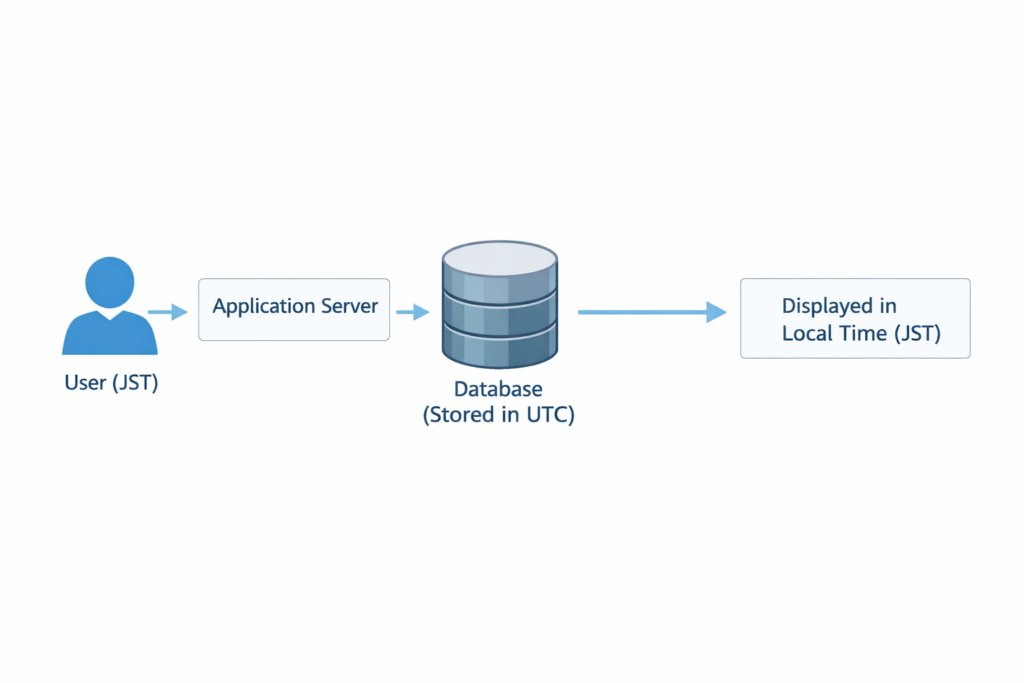
- 7 7. Time zone design (store in UTC, display in local time)
- 8 8. Practical examples you can use as-is
- 8.1 8.1 Automatically insert the current time into logs
- 8.2 8.2 Update the last login time
- 8.3 8.3 Fix a reference time in batch jobs
- 8.4 8.4 Aggregation for today / yesterday / past 7 days
- 8.5 8.5 Expiration checks (sessions/tokens)
- 8.6 8.6 Get rows expiring within N hours
- 8.7 What you must always keep in mind
- 8.8 Key takeaways from this section
- 9 9. Frequently Asked Questions (FAQ)
- 9.1 9.1 What’s the difference between NOW() and CURRENT_TIMESTAMP?
- 9.2 9.2 Should you use SYSDATE()?
- 9.3 9.3 Why is the time shifted?
- 9.4 9.4 CONVERT_TZ() returns NULL
- 9.5 9.5 Range shifts with BETWEEN
- 9.6 9.6 How do you choose between DATETIME and TIMESTAMP?
- 9.7 9.7 Microseconds aren’t being stored
- 9.8 Key takeaways from this section
- 10 10. Summary
1. The shortest SQL to get the current date/time in MySQL
If you want to get the current date/time in MySQL, the first functions to remember are NOW() and CURRENT_TIMESTAMP. Below are the shortest SQL examples by use case.
1.1 Get the current date/time (basic)
SELECT NOW();
or
SELECT CURRENT_TIMESTAMP;
- Both return the current date/time (YYYY-MM-DD HH:MM:SS).
- Within the same query, the time is fixed at the “query start time.”
Use cases
- Logging
- Getting a record creation timestamp
- Getting a reference time
Common mistake
- The app time zone and DB time zone differ and “time shifts.”
→ Check withSELECT @@session.time_zone;
1.2 Get today’s date only
SELECT CURDATE();
- Return format:
YYYY-MM-DD - Type is DATE (date only, not datetime)
Use cases
- Searching “today’s data”
- Daily aggregation
Notes
- Unlike
NOW(), it does not include time. - If you need time for range queries, use
NOW().
1.3 Get the current time only
SELECT CURTIME();
- Return format:
HH:MM:SS - Type is TIME (time only)
Use cases
- Displaying batch execution time
- Printing only the time portion in logs
Common pitfall
- Because it doesn’t include a date, you can’t use it for datetime comparisons.
1.4 Get the current time in UTC (important)
SELECT UTC_TIMESTAMP();
- Returns UTC regardless of the server time zone.
- Recommended for global services.
Baseline policy in real projects
- Store in UTC
- Convert to local time when displaying
Notes
- If the app already converts to UTC, beware of double conversion.
1.5 Get milliseconds / microseconds
SELECT NOW(3);  -- milliseconds (3 digits after the decimal point)
SELECT NOW(6);  -- microseconds (6 digits after the decimal point)
- Available in MySQL 5.6.4 and later.
- Used for high-precision logs and transaction auditing.
Common misconception
NOW()alone cannot return fractional seconds.- Your column must also specify precision, e.g.
DATETIME(6).
1.6 Best function by use case (start here if unsure)
| Use case | Recommended function |
|---|---|
| General current datetime | NOW() |
| Table default value | CURRENT_TIMESTAMP |
| Date only | CURDATE() |
| Time only | CURTIME() |
| Unified UTC management | UTC_TIMESTAMP() |
| High-precision logs | NOW(6) |
Key points people often miss
NOW()andCURRENT_TIMESTAMPare effectively equivalent (same value)- Within the same query, the time is fixed
- The displayed value changes depending on time zone settings
- For microseconds, your column definition must specify precision
2. Differences between NOW() / CURRENT_TIMESTAMP / SYSDATE()
There are multiple functions to get the current time, but the most confusing part is the difference between NOW(), CURRENT_TIMESTAMP, and SYSDATE().
If you don’t understand this correctly, you can get unexpected behavior in logs and transaction processing.
2.1 NOW() and CURRENT_TIMESTAMP are effectively equivalent
SELECT NOW(), CURRENT_TIMESTAMP;
- Both return the current datetime (a DATETIME value).
- Within the same query, the time is fixed at the “query start time.”
CURRENT_TIMESTAMPcan also be used with function-call syntax:
SELECT CURRENT_TIMESTAMP();
How to choose in real projects
| Use case | Recommended |
|---|---|
| Simple retrieval | NOW() |
| Table DEFAULT / ON UPDATE | CURRENT_TIMESTAMP |
Important points
- The meaning of the retrieved value is the same.
- The main difference is syntax/usage (e.g., allowed in DEFAULT).
- It’s not a type difference (easy to misunderstand).
2.2 SYSDATE() returns the time at “evaluation time”
SYSDATE() looks similar to NOW(), but the timing of when the value is fixed is different.
SELECT NOW(), SLEEP(2), NOW();
Result (example):
2025-02-23 14:00:00
2025-02-23 14:00:00
SELECT SYSDATE(), SLEEP(2), SYSDATE();
Result (example):
2025-02-23 14:00:00
2025-02-23 14:00:02
The essential difference
| Function | When the time is fixed |
|---|---|
NOW() | Query start time |
SYSDATE() | Evaluation time |
In other words, SYSDATE() can change within the same query as time passes.
2.3 Notes for transactions and replication
Because NOW() is fixed at query start, it is
safer when you need a consistent reference time inside a transaction.
On the other hand, because SYSDATE() depends on execution timing, it can affect reproducibility in:
- Replication
- Batch jobs
- Bulk log processing
Rule of thumb
- Want a fixed reference time →
NOW() - Need the exact instant every time →
SYSDATE()(limited use)
2.4 Note: CURRENT_DATE / CURRENT_TIME / LOCALTIME
MySQL also supports:
SELECT CURRENT_DATE;
SELECT CURRENT_TIME;
SELECT LOCALTIME;
CURRENT_DATE→ same asCURDATE()CURRENT_TIME→ same asCURTIME()LOCALTIME→ same asNOW()
Common confusion
- These are mostly “cosmetic differences”; there’s little functional difference.
- For safety, prioritize readability and standardize within the project.
Key takeaways from this section
NOW()andCURRENT_TIMESTAMPmean essentially the same thing.SYSDATE()behaves differently because it’s based on evaluation time.- For fixed reference times, use
NOW()as the default. - Use
CURRENT_TIMESTAMPfor DEFAULT and ON UPDATE.
3. Change the display format of the current date/time
The current time you get with NOW() is displayed by default as YYYY-MM-DD HH:MM:SS. In real work, you’ll often need things like:
- Show date only
- Use
YYYY/MM/DD - Use a localized format (e.g., Feb 23, 2025)
- Show milliseconds
For this, use DATE_FORMAT() (convert a datetime to an arbitrary string format).
3.1 Basic syntax of DATE_FORMAT()
DATE_FORMAT(datetime, 'format_string')
Example: Convert the current time to YYYY/MM/DD HH:MM
SELECT DATE_FORMAT(NOW(), '%Y/%m/%d %H:%i');
Output example:
2025/02/23 14:35
Common format specifiers
| Specifier | Meaning | Example |
|---|---|---|
%Y | 4-digit year | 2025 |
%m | 2-digit month | 02 |
%d | 2-digit day | 23 |
%H | Hour (24-hour) | 14 |
%i | Minutes | 35 |
%s | Seconds | 50 |
%f | Microseconds | 123456 |
Notes
- Some specifiers differ between uppercase/lowercase.
%his 12-hour time,%His 24-hour time.
3.2 Common format examples (frequent in real work)
1. Slash-separated
SELECT DATE_FORMAT(NOW(), '%Y/%m/%d');
2. Localized (English)
SELECT DATE_FORMAT(NOW(), '%b %d, %Y');
3. Without seconds
SELECT DATE_FORMAT(NOW(), '%Y-%m-%d %H:%i');
Common pitfall
- Because it returns a string, you can’t use it for numeric calculations.
- For comparisons and searches, you should use the original DATETIME type.
3.3 Extract only the date or time part
You can also retrieve parts while keeping the type (instead of formatting to a string).
SELECT DATE(NOW());   -- date only (DATE type)
SELECT TIME(NOW());   -- time only (TIME type)
SELECT YEAR(NOW());   -- year only
SELECT MONTH(NOW());  -- month only
SELECT DAY(NOW());    -- day only
Recommended usage
| Goal | Recommended |
|---|---|
| Formatting for display | DATE_FORMAT |
| Calculation / comparison | DATE() / TIME() |
3.4 Display with microseconds
When you need high-precision logs:
SELECT NOW(6);
With formatting:
SELECT DATE_FORMAT(NOW(6), '%Y-%m-%d %H:%i:%s.%f');
Important notes
- Your column must be
DATETIME(6)orTIMESTAMP(6), otherwise the precision won’t be stored. - Not available in MySQL versions older than 5.6.4 (environment-dependent).
Common mistakes
- Using
DATE_FORMAT()in a WHERE clause prevents indexes from being used.- Bad example:
WHERE DATE_FORMAT(created_at, '%Y-%m-%d') = '2025-02-23' - Recommended:
WHERE created_at >= '2025-02-23 00:00:00' AND created_at < '2025-02-24 00:00:00'
- Bad example:
- Storing the display-formatted string directly (hurts search performance)
Key takeaways from this section
- Use
DATE_FORMAT()to change display formats. - For calculations/comparisons, keep the original type.
- If you need microseconds, specify precision in the column definition.
- Using functions in WHERE clauses can cause performance issues.
4. Datetime calculations using the current time
In MySQL, it’s common to calculate things like “N hours later,” “N days ago,” or “the past N days” based on the current time.
The most common real-world case is “get data from the past 24 hours.”
The foundation of datetime arithmetic is INTERVAL (syntax for adding/subtracting time units).
4.1 Add/subtract with INTERVAL
Get 1 hour later
SELECT NOW() + INTERVAL 1 HOUR;
Get 3 days ago
SELECT NOW() - INTERVAL 3 DAY;
Get 1 month later
SELECT NOW() + INTERVAL 1 MONTH;
Common units
| Unit | Meaning |
|---|---|
| SECOND | Seconds |
| MINUTE | Minutes |
| HOUR | Hours |
| DAY | Days |
| WEEK | Weeks |
| MONTH | Months |
| YEAR | Years |
Common mistakes
DAYinINTERVAL 1 DAYworks even in lowercase, but you should standardize within the team.- Month-end calculations can differ from expectations because the number of days varies (e.g., Jan 31 + 1 month).
4.2 Get data from the past 24 hours (most common pattern)
SELECT *
FROM users
WHERE created_at >= NOW() - INTERVAL 1 DAY;
Meaning
- Targets “from right now back to 24 hours ago.”
Notes
- If you use
CURDATE(), the baseline becomes “today at 00:00,” which changes the meaning.
Example (today’s data):
SELECT *
FROM users
WHERE created_at >= CURDATE();
Understanding the difference is critical
| Expression | Meaning |
|---|---|
NOW() - INTERVAL 1 DAY | Past 24 hours |
CURDATE() | Since today 00:00 |
4.3 Get day differences with DATEDIFF()
SELECT DATEDIFF('2025-03-01', '2025-02-23');
Result:
6
- Unit is “days”
- The time portion is ignored
Notes
- The sign changes depending on argument order.
- You can’t compute differences in hours/minutes/seconds.
4.4 Use TIMESTAMPDIFF() for hours/minutes/seconds
SELECT TIMESTAMPDIFF(HOUR,
                     '2025-02-23 12:00:00',
                     '2025-02-23 18:30:00');
Result:
6
Minutes
SELECT TIMESTAMPDIFF(MINUTE,
                     '2025-02-23 12:00:00',
                     '2025-02-23 12:30:00');
Seconds
SELECT TIMESTAMPDIFF(SECOND,
                     '2025-02-23 12:00:00',
                     '2025-02-23 12:00:45');
Use cases
- Session duration calculations
- Expiration checks
- Timeout decisions
4.5 Get month start / month end (common real-world trap)
Get the first day of this month:
SELECT DATE_FORMAT(NOW(), '%Y-%m-01');
First day of next month:
SELECT DATE_FORMAT(NOW() + INTERVAL 1 MONTH, '%Y-%m-01');
Notes
- Month-end is not a fixed date.
- For range queries, “>= start AND < first day of next month” is safe.
Common mistakes summary
- Using
BETWEENwith date-only values and forgetting time - Disabling indexes by using
DATE(created_at)in WHERE clauses - Getting trapped by the “31st day” issue in month calculations
- Misunderstanding the difference between
NOW()andCURDATE()
Key takeaways from this section
INTERVALis the foundation of datetime arithmetic.- Past 24 hours =
NOW() - INTERVAL 1 DAY. - Days =
DATEDIFF(); smaller units =TIMESTAMPDIFF(). - Be careful with end conditions for month-based calculations.
5. For range queries, this is safer than BETWEEN
When doing date range searches in MySQL, many beginners use BETWEEN. However, it often produces unintended results if you mishandle time boundaries, so a safer pattern is recommended in real work.
5.1 BETWEEN basics and the pitfall
A common query
SELECT *
FROM orders
WHERE order_date BETWEEN '2025-02-01' AND '2025-02-10';
It looks fine, but internally it’s equivalent to:
WHERE order_date >= '2025-02-01 00:00:00'
  AND order_date <= '2025-02-10 00:00:00'
So it does not include data after 00:00 on Feb 10.
5.2 Safer pattern (recommended)
Recommended pattern
SELECT *
FROM orders
WHERE order_date >= '2025-02-01 00:00:00'
  AND order_date <  '2025-02-11 00:00:00';
Key points
- Specify the end boundary as “less than next day at 00:00”
- Safer than
<= 23:59:59(supports microseconds)
5.3 The correct way to get today’s data
Bad example:
WHERE DATE(created_at) = CURDATE();
Problems:
- Applying a function to the column disables indexes
- Can cause serious slowdowns on large tables
Recommended:
WHERE created_at >= CURDATE()
  AND created_at <  CURDATE() + INTERVAL 1 DAY;
This ensures:
- Indexes can be used
- Fast searches
- No boundary issues
5.4 Safe patterns for the past 7 / past 30 days
Past 7 days
WHERE created_at >= NOW() - INTERVAL 7 DAY;
Past 30 days
WHERE created_at >= NOW() - INTERVAL 30 DAY;
Notes
CURDATE() - INTERVAL 7 DAYis based on “today 00:00”NOW() - INTERVAL 7 DAYis based on “current time”- Choose based on requirements
5.5 Key rule to keep indexes effective
Bad:
WHERE DATE(created_at) = '2025-02-23';
Good:
WHERE created_at >= '2025-02-23 00:00:00'
  AND created_at <  '2025-02-24 00:00:00';
Why:
- Indexes work on “the column itself”
- Applying a function prevents index usage (full scan)
Common mistakes summary
- Forgetting to include time at the end boundary in
BETWEEN - Missing microseconds when using
23:59:59 - Using
DATE()in WHERE clauses and slowing queries - Leaving “now” vs “today 00:00” ambiguous
Key takeaways from this section
- Range queries are safest with
>= start AND < end. BETWEENrequires careful boundary handling.- To keep indexes effective, do not wrap columns in functions.
- Clearly choose between
NOW()-based andCURDATE()-based logic.
6. DEFAULT CURRENT_TIMESTAMP and ON UPDATE (table design basics)
In database design, it’s common to automatically manage created_at and updated_at.
In MySQL, CURRENT_TIMESTAMP lets you set the current time automatically on insert and update.
6.1 Auto-set created_at (DEFAULT CURRENT_TIMESTAMP)
CREATE TABLE users (
    id INT AUTO_INCREMENT PRIMARY KEY,
    name VARCHAR(255),
    created_at TIMESTAMP DEFAULT CURRENT_TIMESTAMP
);
Behavior:
INSERT INTO users (name) VALUES ('Alice');
→ The current time is automatically inserted into created_at.
Key points
CURRENT_TIMESTAMPcan be used in DEFAULT.NOW()cannot be used directly in DEFAULT.
Common mistake
created_at DATETIME DEFAULT NOW(); -- error
Reason:
- In MySQL, you generally can’t set a function as DEFAULT (the exception is CURRENT_TIMESTAMP).
6.2 Auto-update updated_at (ON UPDATE)
CREATE TABLE users (
    id INT AUTO_INCREMENT PRIMARY KEY,
    name VARCHAR(255),
    created_at TIMESTAMP DEFAULT CURRENT_TIMESTAMP,
    updated_at TIMESTAMP DEFAULT CURRENT_TIMESTAMP
               ON UPDATE CURRENT_TIMESTAMP
);
Behavior:
UPDATE users SET name = 'Bob' WHERE id = 1;
→ updated_at is automatically updated to the current time.
Use cases
- Last login tracking
- Update history
- Audit logs
6.3 DATETIME vs TIMESTAMP (important)
| Type | Range | Time zone impact |
|---|---|---|
| DATETIME | Year 1000 to 9999 | No |
| TIMESTAMP | 1970 to 2038 | Yes |
The essential difference
TIMESTAMPis stored internally in UTC and converted to the session time zone on display.DATETIMEstores the literal value (no conversion).
Guidelines
| Case | Recommended type |
|---|---|
| Log management | TIMESTAMP |
| Future dates (after 2038) | DATETIME |
| Fixed values not requiring TZ conversion | DATETIME |
6.4 CURRENT_TIMESTAMP can also be used with DATETIME
In MySQL 5.6 and later, you can specify CURRENT_TIMESTAMP as DEFAULT and ON UPDATE for DATETIME columns as well.
created_at DATETIME DEFAULT CURRENT_TIMESTAMP
Notes
- Older MySQL versions have restrictions (environment-dependent).
- If you need precision:
DATETIME(6) DEFAULT CURRENT_TIMESTAMP(6)
6.5 If you want to use NOW(): an alternative (trigger)
CREATE TRIGGER set_created_at
BEFORE INSERT ON logs
FOR EACH ROW
SET NEW.created_at = NOW();
Use cases
- Complex initial value logic
- Conditional timestamp assignment
Notes
- Triggers are hard to debug.
- Avoid them unless necessary.
Common design mistakes
- Adding ON UPDATE to both
created_atandupdated_at - Confusing DATETIME and TIMESTAMP behavior
- Postponing time zone decisions
Key takeaways from this section
- Use
CURRENT_TIMESTAMPfor DEFAULT. - Use
ON UPDATE CURRENT_TIMESTAMPfor update tracking. - Choose types based on time zone behavior and the 2038 problem.
- If you need precision, don’t forget
(6).
7. Time zone design (store in UTC, display in local time)
When dealing with current time, bad time zone design causes time drift and double conversion.
In practice, the safest default is “store in UTC, convert to local time for display.”
7.1 Check the current time zone
First, check which time zone MySQL is running in.
SELECT @@global.time_zone, @@session.time_zone;
@@global.time_zone→ server-wide setting@@session.time_zone→ current connection/session setting- If it shows
SYSTEM, it depends on the OS setting
Common issues
- Production and development servers have different OS time zones
- The app converts to UTC, and the DB converts again (double conversion)
7.2 Change the time zone per session
SET time_zone = 'Asia/Tokyo';
or unify to UTC:
SET time_zone = '+00:00';
Important points
- It reverts when the connection is closed
- If you use connection pooling, check your application settings
7.3 Why store in UTC (real-world principle)
Recommended policy
- Store data in UTC
- Convert to the user’s time zone when displaying
Reasons:
- Easier international support
- Avoid daylight saving time (DST) issues
- Minimize impact when moving servers
Get UTC:
SELECT UTC_TIMESTAMP();
7.4 Convert time zones with CONVERT_TZ()
Example: UTC → JST
SELECT CONVERT_TZ('2025-02-23 05:35:00', '+00:00', '+09:00');
Using time zone names:
SELECT CONVERT_TZ('2025-02-23 05:35:00', 'UTC', 'Asia/Tokyo');
Real-world example
SELECT CONVERT_TZ(created_at, 'UTC', 'Asia/Tokyo')
FROM users;
7.5 Why CONVERT_TZ() returns NULL
If it returns NULL, common causes include:
- MySQL time zone tables are not loaded
- The specified time zone name does not exist
Example load on Linux:
mysql_tzinfo_to_sql /usr/share/zoneinfo | mysql -u root -p mysql
Notes
- In production, confirm permissions and whether a restart is required
- In Docker, zoneinfo may not be included depending on the image
7.6 Change the server-wide time zone
Config file (my.cnf / my.ini):
[mysqld]
default_time_zone = '+00:00'
Verify after restart:
SELECT @@global.time_zone;
Important
- For production changes, confirm the scope of impact
- Be careful with existing data (sometimes only display changes)
Common mistakes
- Storing local time instead of UTC, then adding international support later
- Double conversion between the app and DB
- Designing with DATETIME without considering time zones
- Different TZ settings between test and production
Key takeaways from this section
- Store in UTC and convert on display.
- Use
UTC_TIMESTAMP(). - When using
CONVERT_TZ(), verify the TZ tables. - Always account for environment differences in time zones.
8. Practical examples you can use as-is
Here are concrete SQL examples showing how to use MySQL current time in real development/operations.
They are written so you can copy and paste directly.
8.1 Automatically insert the current time into logs
Create table
CREATE TABLE system_logs (
    id INT AUTO_INCREMENT PRIMARY KEY,
    level VARCHAR(50),
    message TEXT,
    created_at TIMESTAMP DEFAULT CURRENT_TIMESTAMP
);
Insert log
INSERT INTO system_logs (level, message)
VALUES ('ERROR', 'Failed to connect to the DB');
Key points
created_atis inserted automatically- No need to pass a timestamp from the app
- Essential design for auditing and incident investigation
Common mistakes
- Managing time in both the app and DB
- Time inconsistencies due to non-unified time zones
8.2 Update the last login time
Table design
CREATE TABLE users (
    id INT AUTO_INCREMENT PRIMARY KEY,
    username VARCHAR(255),
    last_login TIMESTAMP DEFAULT CURRENT_TIMESTAMP
               ON UPDATE CURRENT_TIMESTAMP
);
Update on login
UPDATE users
SET last_login = NOW()
WHERE id = 1;
Notes
ON UPDATEfires only when the column changes- Some UPDATE statements may not change the value and thus not update
8.3 Fix a reference time in batch jobs
For long-running processes, it’s safer to fix a reference time.
SET @base_time = NOW();

SELECT *
FROM orders
WHERE created_at >= @base_time - INTERVAL 1 DAY;
Why
- The time doesn’t shift mid-process
- Consistency is maintained
8.4 Aggregation for today / yesterday / past 7 days
Today’s sales
SELECT SUM(amount)
FROM orders
WHERE created_at >= CURDATE()
  AND created_at <  CURDATE() + INTERVAL 1 DAY;
Yesterday’s sales
SELECT SUM(amount)
FROM orders
WHERE created_at >= CURDATE() - INTERVAL 1 DAY
  AND created_at <  CURDATE();
Past 7 days
SELECT COUNT(*)
FROM users
WHERE created_at >= NOW() - INTERVAL 7 DAY;
Important
- Don’t apply functions to columns in WHERE clauses
- Write conditions that keep indexes usable
8.5 Expiration checks (sessions/tokens)
SELECT *
FROM sessions
WHERE expires_at > NOW();
Delete expired rows
DELETE FROM sessions
WHERE expires_at <= NOW();
Common mistakes
- Using
CURDATE()and ignoring time - Storing UTC but comparing with local
NOW()
8.6 Get rows expiring within N hours
SELECT *
FROM coupons
WHERE expires_at <= NOW() + INTERVAL 1 HOUR;
Use cases:
- Expiration alerts
- Expiry notifications
What you must always keep in mind
- Be explicit whether your baseline is “now” or “today 00:00”
- Write predicates that keep indexes effective
- Decide time zone design upfront
- Don’t mix
NOW()andUTC_TIMESTAMP()without a clear policy
Key takeaways from this section
- For logs/audits/update tracking, use
CURRENT_TIMESTAMP - For aggregation, use the safe
>= AND <pattern - For session management, compare with
NOW() - Fix a baseline time to keep processing consistent
9. Frequently Asked Questions (FAQ)
Here are common questions about MySQL current time, especially the pitfalls that come up in real work.
9.1 What’s the difference between NOW() and CURRENT_TIMESTAMP?
Conclusion: the meaning of the returned value is the same.
SELECT NOW(), CURRENT_TIMESTAMP;
Both return the current datetime.
The main difference is syntactic usage
CURRENT_TIMESTAMPcan be used inDEFAULTandON UPDATENOW()can’t be used directly in DEFAULT
Notes
- It’s not a type difference
- You can specify precision with arguments like
(6)
9.2 Should you use SYSDATE()?
SYSDATE() returns the time at “evaluation time.”
SELECT SYSDATE(), SLEEP(2), SYSDATE();
The value can change even within the same query.
When to use it
- When you need to record the exact real time instant
When to avoid it
- Replication
- Transaction processing where consistency matters
In most cases, using NOW() is sufficient.
9.3 Why is the time shifted?
Main causes:
- Server time zone settings
- Session time zone settings
- Double conversion with the application
- Automatic conversion behavior of the TIMESTAMP type
Check with:
SELECT @@global.time_zone, @@session.time_zone;
Mitigation
- Store in UTC by default
- Convert only when displaying
- Unify the policy between app and DB
9.4 CONVERT_TZ() returns NULL
Causes:
- Time zone tables are not loaded
- Incorrect time zone name
Fix:
mysql_tzinfo_to_sql /usr/share/zoneinfo | mysql -u root -p mysql
Be especially careful in Docker environments.
9.5 Range shifts with BETWEEN
Bad:
WHERE created_at BETWEEN '2025-02-01' AND '2025-02-10';
Safe:
WHERE created_at >= '2025-02-01 00:00:00'
  AND created_at <  '2025-02-11 00:00:00';
Reasons:
- End boundary time issue
- Microseconds leakage
- Index efficiency
9.6 How do you choose between DATETIME and TIMESTAMP?
- International support / UTC management → TIMESTAMP
- After 2038 or fixed datetimes → DATETIME
Decide this during design.
9.7 Microseconds aren’t being stored
Cause:
- No precision specified in the column definition
Fix:
created_at DATETIME(6)
Key takeaways from this section
- Start with
NOW()andCURRENT_TIMESTAMP - For range queries, use
>= AND < - UTC storage is the safest default
- Don’t forget type selection and precision
10. Summary
This article organized practical ways to retrieve, format, calculate, and manage the current time in MySQL.
Finally, here are the minimum essentials you should know to stay safe.
10.1 Getting the current time (basics)
- General retrieval →
NOW() - Table DEFAULT / update tracking →
CURRENT_TIMESTAMP - Date only →
CURDATE() - Time only →
CURTIME() - UTC →
UTC_TIMESTAMP() - High precision →
NOW(6)
Rules of thumb
- If unsure, using
NOW()is fine in most cases. - For schema design, use
CURRENT_TIMESTAMP.
10.2 Range queries: “>= AND <” is the golden rule
Safe pattern:
WHERE created_at >= 'START'
  AND created_at <  'END'
Why:
- Prevents missing end-boundary rows
- Works with microseconds
- Keeps indexes usable
Bad example
WHERE DATE(created_at) = CURDATE();
Don’t wrap the column in a function.
10.3 Datetime arithmetic basics
- Add/subtract →
INTERVAL - Day differences →
DATEDIFF() - Time differences →
TIMESTAMPDIFF()
Always keep in mind whether your baseline is “now” or “today 00:00.”
10.4 Time zone design principles
- Store in UTC
- Convert on display
- Unify policy between app and DB
Check with:
SELECT @@global.time_zone, @@session.time_zone;
10.5 Table design best practices
created_at TIMESTAMP DEFAULT CURRENT_TIMESTAMP,
updated_at TIMESTAMP DEFAULT CURRENT_TIMESTAMP
           ON UPDATE CURRENT_TIMESTAMP
- Standard equipment for auditing/logging/update tracking
- If you need precision, specify
(6)
The 4 most important real-world points
- Don’t misunderstand the difference between
NOW()andCURRENT_TIMESTAMP - For range queries, use
>= AND < - Store in UTC by default
- Decide types (DATETIME vs TIMESTAMP) during design
MySQL current time handling is foundational for logging, sales aggregation, auth/session management, batch jobs, and more.
If you follow the principles in this article, you can avoid many common problems such as time drift, boundary bugs, and performance degradation.